"The illiterate of the future will be the person ignorant of the use of the camera as well as of the pen." -Laszlo Moholy-Nagy, 1936


Find contents of this blog here


us online casinos - US Online casinos top ratings and reviews.
Showing posts with label photo exercise. Show all posts

Friday, May 23, 2008

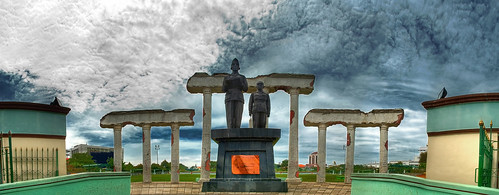
Photo Journal/Exercise 8: SURABAYA - Street/Urban Photography


by Angga Andinata (xp08)

by Antonius Teiseran (xp08)

Try to find symbols to describe your opinion about the city of Surabaya (symbols about life in the city, and not merely symbols of the city).

Try to capture UNIQUE or seldom seen images of the city, avoid cliche images. However, it could be something often seen, but you depict it in a new or unique way.

It's subjective, and it's your personal perspective of the city. And you're allowed to manipulate/edit your images as you like them to be (such as using HDR, fake tilt-shift, color adjustments, or just natural or as is).

THIS IS OUR PART IN CELEBRATING SURABAYA'S 715th BIRTHDAY THIS COMING MAY 31st.

Pick TWO of your best pictures and print them to minimum 10R size prints, and paste them to a black hardboard/infraboard with 3 cm margins all around. TYPE the TITLE, YOUR NAME, and ID# on a label and paste it on each of your boards on the front bottom right corner.

WE'LL SELECT THE BEST ONES AND HANG THEM UP FOR A SMALL EXHIBITION ALONG THE DEPARTMENT HALL. There'll be a voting session to decide who's got the best photo, and deserves bonus points.

In general, the history of urban photography can be divided into two trends:
- depiction within a topographical approach (the distant gaze and the panoramic view)
- depiction of urban life at street level

To get you started on ideas about our city, here are some compiled terms that are often used to describe the modern city and urban life...
brave, complex, the slums, engines of change, disconnected, paradox, juxtaposition of paradox, fragments, isolation, a melting pot, spectacular, utopia, turbo-capitalism, populated, polution, opportunities, globalization, urbanization, the poor, poverty, dynamic, modern structures, skyscrapers, floods, traffic jams, colorful life, mega-malls, mall-ification, unsafe, threatening, new dimensions, continuous development, walls, migration, urban spaces, terror, fear, modern alienation, spontaneity, jazz, dense, posturban sublime, hectic, infrastructures, urban landscape, parking lots, banal, everyday, offices, construction sites, houses, metropolitan condition, the old and the new, colorful contrasts, extremes, artificiality, self-reflection, simulated, tourism, modern dream, ever-changing, the future, futuristic, separation, borders,…

HOW WOULD YOU DEPICT SURABAYA???

Wednesday, May 14, 2008

Photo Journal/Exercise 7: OCCUPATION - Perspectives/Points of View

Do a "short" documentary photography on a person with or at his/her job. Your pictures should reflect your perspective/point of view about your subject and/or his/her occupation.

This can be done individually or with a group of maximum 5 people per subject/occupation, with minimum of 50 shots/person.
Each person then makes a photo essay of 5 selected photos that can summarize the subject and the occupation and 3 written paragraphs about him/her and his/her occupation.
Give a main title for your documentary essay and titles for each of the five photos.

Only minor adjustments allowed, such as cropping, color adjustments, contrast adjustments, & sharpness.

Some tips for this assignment:
- show interest in the subject and the occupation, get to know the person and his/her part of life, troubles, likes/dislikes, etc. before the actual shooting session
- shoot portraits (portraitures)
- shoot candid portraits
- shoot sequences while the subject is doing the job (if fast, use continuous shooting)
- shoot extreme close-ups and close-ups to get his/her character, medium shots for the relationship of the subject to his/her job and surrounding, and long shots to capture the overall job environment

Friday, May 2, 2008

PROJECT 2 (DI): SUPER WORLD RECORD OF...

This idea was inspired & taken from the book Visual Literacy: A Conceptual Approach to Graphic Problem Solvingby Judith & Richard Wilde, a great book by the way on the subject. But I've improvised it here into a photographic digital imaging assignment.

The challenge is to illustrate, through PHOTOGRAPHIC DIGITAL IMAGING, a world record of any fact, statistic, deed, or achievement, in any field or subject area.
Consider the natural world, outer space, bizarre and outrageous stunts, challenging exploits, great sports accomplishments, or occurences that are ridiculous, provocative, or shocking.

Tuesday, April 22, 2008

"Multi-Expose" by XP2007

"Seven Kinds" by xp07 Kevin Winaldy (04)

"Evalagus" by xp07 Yohan Ariel (04)

Untitled by xp07 Heru Wibowo (04)

"Makan Besar" / "Big Meal" by xp07 Vicky Tanzil (04)

Wednesday, April 9, 2008

PROJECT 1 (DI): SURREALISM


The first Digital Imaging Project is to create a surrealist image that has to do with the human condition. It's HUMANITY as the big theme and it must contain elements of a human being and his/her surrounding, environment, nature, civilization, social/cultural condition. Find ideas from your dreams, fantasy, songs, poetry, literature, art. A good surreal-photographic image should give one or more of these feelings:
- dreamlike (melancholic, horror,...)
- illogical (proportions, placement,...)
- unexpected (juxtapositions, combinations,...)
- absurdity
- element of surprise
- liberate imagination
At the top of this post are a couple of books for reference.
Other references you could find with the works of Salvador Dali (paintings), Rene Magritte (paintings), Alessandro Bavari, Maggie Taylor, and Domen Lombergar among others.

To see how DI has helped many ads visualize what they really want to communicate photographically, surf on to:
- Top 50 Shockvertisements - Controversial Ads (SUPER GALLERY)
- The Arab Aquarius blog

Tuesday, March 25, 2008

Photo Journal/Exercise 6 (Photo-DI): High Dynamic Range (HDR) Photography


Now moving fast from the past to the future in the second digital imaging exercise.... it's HDR Photography!

High
Dynamic Range
or HDR photography has been a popular technique since the emergence of digital cameras. It is a technique where 3 or more different exposures of the same picture are taken and merged or composited together to show each photo’s best detailed areas and give the maximum range of details and “information” from the darkest to the lightest parts (dynamic range) in “one” photo.

It is closer or even higher than the dynamic range of the human eyes, where for a digital camera can only capture a third of our dynamic range in a single shot. The result image of a HDR photo in general looks very sharp with long depth of field, clearly detailed in the darkest to lightest areas, and has a wider range of colors, often resembling to contemporary hyperrealistic paintings. It seems “more real” than reality. Even though it is close to our eyes’ dynamic range, HDR photo somehow seems to show an “enhanced” reality or a clearer reality. This is the purpose of the exercise, which is to show such capabilities in digital photography and imaging, and how you can explore such hyperrealism. This is truly an experiment that has been impossible to capture using only traditional photographic methods.

Approximate exposure ranges of photographic capture and storage media. From top to bottom: Finished Print, Computer Monitor, Transparency Film, Digital Camera, Negative Film, Normal Human Vision, HDR Image.

For examples of HDR photos, you can go to Flickr and type in "HDR", or click here, or join one of the HDR groups
.

HDR photos are multi-exposure blended photos taken at a constant aperture setting with different shutter speeds and then blended into High Dynamic Range images with either Photoshop or another great program specially made for HDR called Photomatix. You can download the free trial here.

After generating your HDR composite, there is a process called Tone Mapping, where you are converting from a 32-bit image into a lower 16-bit or 8-bit image, this can be done also in Photoshop or in Photomatix.

Now, instead of rewriting or RSS feeding the full techniques here, I'll give you some links that are very good in giving directions on how to make HDR photos:
- How to Create Professional HDR Images
- The Definitive Guide to Realistic High Dynamic Range Images
- Modern HDR photography, a how-to or Saturday morning relaxation (has a complete explanation about HDRi)
- HDR Tutorial: How to create ‘High Dynamic Range’ images using Photomatix

The exercise is to create your HDR photograph by using 3 or more exposures. Try 5 or even 7. You could either use Photoshop or Photomatix-and-Photoshop. Any software you like.
Turn in and show your multiple exposures and your final HDR photo result.

FULL BONUS POINTS IF YOU COULD ALSO EXPERIMENT AND MAKE A STITCHED or PANORAMIC or 360 HDR!!!
Take a peek at:
- www.360icon.com
- www.panoguide.com
- High Impact Photography with Panoramics

Monday, March 24, 2008

Photo Journal/Exercise 5 (DI): RESTORATION

Old family photographs are such precious artifacts. Going through my father's bookcase I found an old album containing old photographs of my late great grandfather's family. My father only remembers his grandfather and grandmother in these pictures, other members he can barely remember.

These photographs carry such interesting clues to the past ways of life, especially about the Chinese Indonesian families during the early 1900's. Note that the men in these pictures wear European (Dutch) style suits, whereas the women wear traditional Javanese dresses. And there's a plant sticking out in the middle of the picture that might be seen as funny. Why didn't they just move it and replant it after taking the picture? But I think it can also be seen as respectful towards all living things, including plants. "Let it be in the picture with us" :)

This is the first digital imaging exercise for the XP class, when we start to shift modes from being a photographer to being a photoshoper :) . There's something interesting also about utilizing modern digital technology, for something old and has a timeless value. With this Restoration exercise, we are utilizing most of the tools used for adjustments and retouching in Photoshop. It is a complex artform in itself. But it is a good exercise to be able to dive into DI quickly, and at the same time making something positive out of it for your family. You could even make it into your personal/family project.
So... the exercise is to restore one of your own family's old photo to its probable original crisp condition, whether in B&W or Color.
Then create 2 versions from it: 1 GOOD B&W PHOTO & 1 GOOD COLOR PHOTO.
- If you have a B&W PHOTO, you need to color it (use the Color blending mode in the Layer panel; using a mousepen would probably be better).
- If you have a COLOR PHOTO, you only need to create a B&W version after you've reconstructed the color to a "proper" condition (use Channel Mixer).


Some more rules & tips:
- Make sure the photo is from your own family/relative or your close friend. Stay away from copyrighted photos.
- Choose a photo that needs restoring the most (like the second photo seen above).
- Remember about non-destructive editing. Keep your original scan on the background layer. Use MANY Adjustment Layers & Maskings to edit selectively (for example Curves adjustment just for the needed areas, and cover the rest that don't need it with masking). Also remember that you can CLIP your Adjustment Layers just for a specific Layer without affecting other Layers below it.

To turn in with a CD:
- Save your original PSD file(s) with the complete layers.
- Save a copy also for each of your BEFORE & AFTER pictures to medium JPEG's for fast review. (1 Before photo, & 2 After photos: in B&W & Color).

You can go to digitalretouch.org for some references.

Monday, March 10, 2008

Photo Journal/Exercise 4: JUXTAPOSITION - Creating New Interpretations

One of the trade secrets or strategies of advertising and contemporary art is the unexpected juxtaposition of things unrelated to attract attention, shock, puzzle, or question people's perception of those things. We can look at Oliviero Toscani's works for example for the United Colors of Bennetton campaign.

This is just one example of many. And when we realize this, we can start to be aware that we are a part of the photograph, because as a viewer, we start to interpret what we see according to our background knowledge, and give NEW meaning(s) to the things posed together on the same scene/photo/frame. So meaning doesn't necessarily comes from the photo, but from the viewer.

A good example would be a Popeye action figure next to an olive fruit. Although these two are unrelated in the type of object they are, when juxtaposed together in the same scene the olive fruit gains new meaning (because of our knowledge of Popeye's wife's name "Olive").

The challenge is to create 10 new photographs that contain interesting/shocking/thought-provoking juxtapositions.
- All subject matters must be different.
- Also try to create unexpected or almost random juxtapositions, and not simply pairs of opposites, that create new meanings and makes the viewer thinks or tries to interpret it in different ways.
- Digital imaging or manipulation is allowed for this exercise. You could "force" your juxtapositions in Photoshop or staging them for the shoot. However, if you could capture juxtapositions as is seen on the spot, that might be better.

For those of you who are itching to get into DI, you can take a look at the works of Platinum FMD for examples. If you decide to manipulate your image, then you have to really be "extreme" in your juxtapositions.

And here are some examples of juxtapositions as seen on the spot...


Here you could see a dead cow and two living pigs in the same river. The cow is left to rot and the pigs are oblivious to the scene and just trying to survive. It gives a feeling of irony between the living and the dead. (Somewhere in Nepal)

Without trying to offend a certain belief... I entitled this Goddog/Doggod --playing with words, because of the juxtaposition of the dog and the dog-like statue. (Kathmandu)

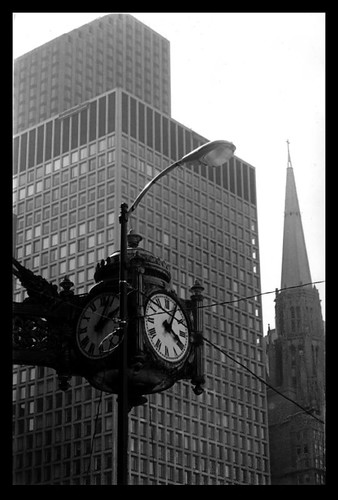
There are three subject matters that are juxtaposed into this one frame; the clock, the modern skyscraper, and the old chapel. The juxtaposition creates a sense of time gap between the old and the modern. It's entitled "History", taken in downtown Chicago.

Wednesday, March 5, 2008

Photo Journal/Exercise 3: MUSIC - Abstraction & Staged

Pick out a song that you like from a band or any musician. It could be instrumental or with lyrics. Then try to photograph something inspired by that music. Get image ideas from its melody, its rhythm/beats, its lyrics, etc. Be poetic. Be artistic.

There are 2 sub-challenges for this exercise.
The first is to shoot abstract photos, and the second is to create staged visualizations of it.
Make about 25 photos of a combination of both types, abstract & staged. Then choose the best 3 for each. Both types are very different in their thinking and process of creating.

The goal of this exercise is to have us translate the language of music into the visual language, which most of the time can speak about similar things, such as rhythm/pattern, melody/line, moods/textures or colors, and so on --this might be for the abstract photos. But also for visualizing a song into a more illustrative and realistic image by staging it. For examples of staged photos you could look at the work of Gregory Crewdson. And for abstract photo examples, you can just go to flickr.com and type in "abstract" in the search box. All photos tagged abstract will show up.

There are several tips for making photo abstractions with your camera:
1. Make it blurry (have either your camera or your subject matter move)
...There's a group in flickr that tosses their cameras with the timer set, so that it'll shoot while flying in the air... (this technique is not suggested though =D )
2. Make extreme close-ups until the subject matter is unidentifiable or almost unidentifiable
3. Make long exposures (at night with moving lights for example)
4. If you have a camera set for infrared, or you have special lenses/filters, use them, but always remember to make your subject matter be vague.
5. Look for strange objects (or their shadows...)

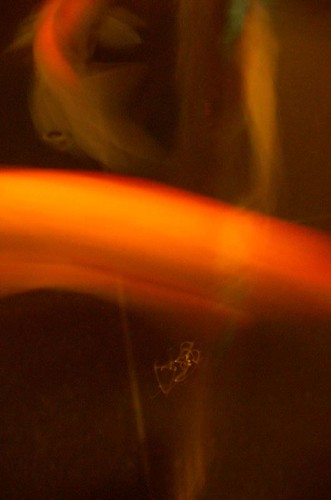
Here are some examples of abstractions I did with koi fish...

They resemble abstract paintings.

I see them as paintings on canvases with expressive and fiery brush strokes.
These were done with some croppings.

now here you can see the painters...
(btw, this one doesn't count as an abstract photo since you can immediately identify the subject matter and it shows a clear setting and space; only the top two count as abstracts)

Sunday, March 2, 2008

Photo Journal/Exercise 2: DESIGN ELEMENTS part 2: LINE, SHAPE, FORM

Continue the Design Elements exercise with Line, Shape, and Form. Take about 50 pictures for this one, then choose 10 of your best. You may sort out your old photos or better yet, take new ones. Lines may be straight, curvy, diagonal, in repetition, etc. The simple difference between Shapes and Forms is that Shapes are 2 dimensional and Forms are 3 dimensional, showing more shadows and highlights that show depth and mass. The most basic shapes are usually silhouette pictures, but try to find others.

But please remember that I'd like to post YOUR BEST PHOTO results here. So feel free to post me a link to your photos.


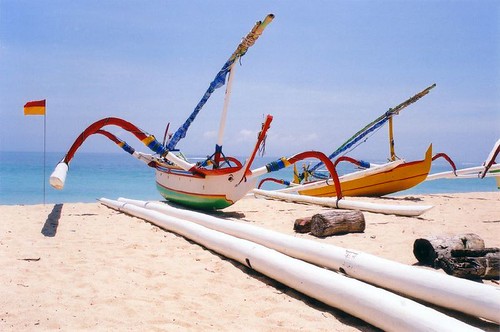
Diagonal lines provide great composition for your photos. This is one example of the use of diagonal lines created from the perspective of the boat sail frame and the wooden poles (shot in Bali, land of photos :) )

Another line composition is the s-curve seen here. It moves the viewers eyes from bottom to top and vice versa. This is one of the ruined parts of Great Wall, Beijing. I saw the man sitting there as a great starting point for a picture leading up to the distant ruins.

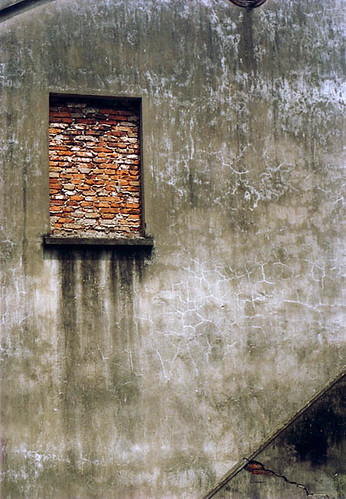
Besides in silhouettes, shapes can be found in many places such as walls or building parts. Try to find geometry in things and build a composition from that. Always remember the Rule of Thirds. Photo taken in a village close to Beijing.

Forms can be found in all things that provide information for it, such as shadows and highlights to show depth and volume or mass. But this photo also shows form from the wire-frames or the grids that lit up from the inside of the lampions. This picture was taken from a lampion festival in Laguna, Surabaya.

Wednesday, February 20, 2008

Photo Journal/Exercise 1: DESIGN ELEMENTS part 1: COLOR, TEXTURE, PATTERN

This first exercise is to get you started on taking pictures... Lots of pictures. Or if you already have lots, then sort them into the three categories. The idea is to take pictures of Design Elements, so you have to pay careful attention to composition.

Take about 100 shots of a combination of anything that has Color, Texture, or Pattern, as the primary focus of the picture. They may and often overlap each other, as sometimes for example a certain texture on a wall may have a vibrant and interesting color on it, etc.
I'd like to post YOUR best results here. So please post me a link to your photos for this exercise and also for future exercises.

Here are just a few examples:


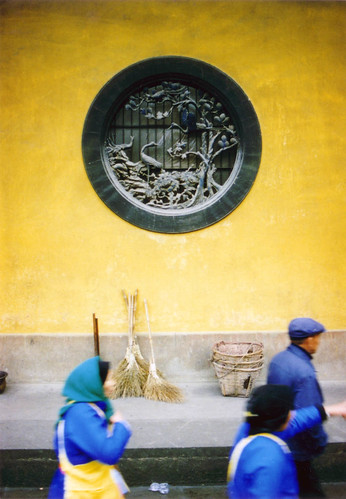
Taken in a temple in China (if I remember correctly, around Hangzhou). I was first interested in the bright yellow color of the wall and its contrast with the people swirming around wearing blue. Then I found this elegant circular carving on the wall. I wanted to juxtapose that stillness beauty with the moving images of the people.

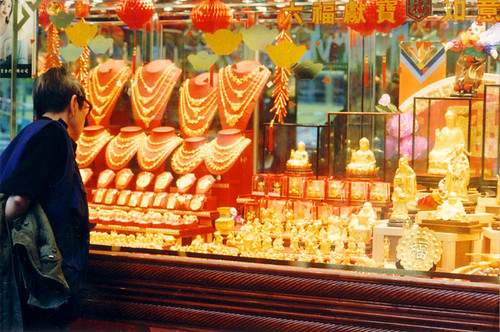
HongKong, the land of wealth. The colors of gold and red say it all.

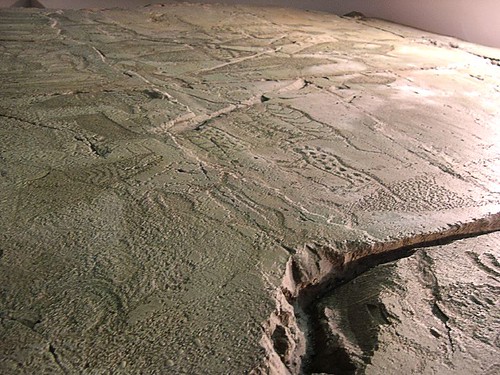
An interesting old relief from a cave. Taken in a Museum in GyeongJu, near Busan, South Korea.

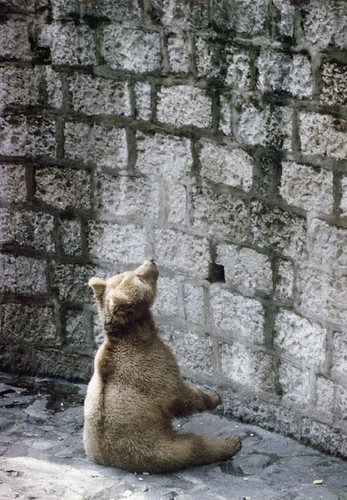
Poor animal captivated in a zoo. The rough texture and composition suggest the mood of the situation (Beijing).

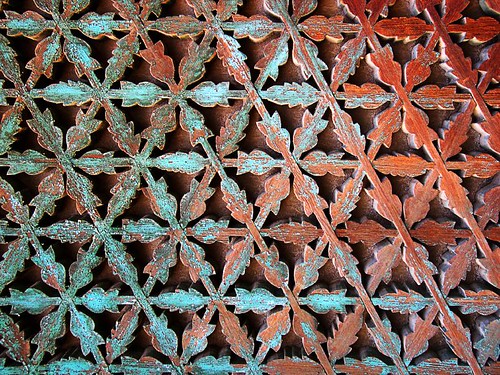
Old traditional sites provide lots of interesting and very often intricate patterns. This one also has nice weathered colors (GyeongJu).

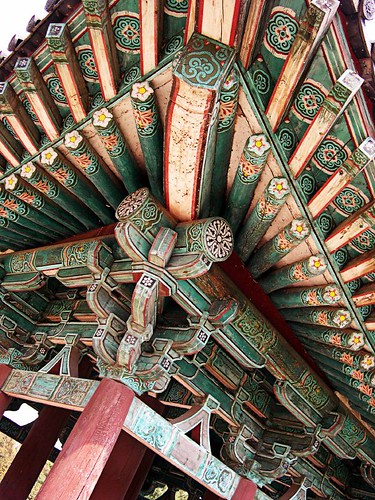
Same goes with this one of a traditional roof top/ceiling.

Wednesday, January 23, 2008

PHOTO EXERCISE 04: JUXTAPOSITION

One of the trade secrets or strategies of advertising and contemporary art is the unexpected juxtaposition of things unrelated to attract attention, shock, puzzle, or question people's perception of those things. We can look at Oliviero Toscani's works for example for the United Colors of Bennetton campaign.

This is just one example of many. And when we realize this, we can start to be aware that we are a part of the photograph, because as a viewer, we start to interpret what we see according to our background knowledge, and give NEW meaning to the things posed together on the same scene/photo. So meaning doesn't necessarily comes from the photo, but from the viewer.

Ok, before going too deep with this... Because this is a hard one.

THE CHALLENGE IS "SIMPLY" TO MAKE PHOTOS OF JUXTAPOSED THINGS. AND THERE ARE TWO TYPES THAT WE COULD EXPLORE:
1. JUXTAPOSITION OF THINGS RELATED AND CONSIDERED PAIRS OR OPPOSITES
2. JUXTAPOSITION OF THINGS UNRELATED AND GIVE NEW MEANING(S) TO THE THINGS PICTURED TOGETHER
...AIM FOR NUMBER 2.

A good example would be a Popeye action figure next to an olive fruit. Although these two are unrelated in the type of object they are, when juxtaposed together in the same scene the olive fruit gains new meaning (because of our knowledge of Popeye's wife's name "Olive").

Saturday, January 12, 2008

PHOTO EXERCISE 03: MUSIC

This is one of my favorite challenges/exercises in photography.

THE CHALLENGE IS TO PICK OUT A SONG THAT YOU LIKE FROM A BAND OR ANY MUSICIAN. IT COULD BE INSTRUMENTAL OR WITH LYRICS. THEN TRY TO PHOTOGRAPH SOMETHING INSPIRED BY THAT MUSIC.

THERE ARE TWO SUB-CHALLENGES FOR THIS:
ONE - IS TO AIM FOR ABSTRACTIONS OR, IN OTHER WORDS, MAKE ABSTRACT PHOTOGRAPHS
TWO - IS TO HAVE NON-ABSTRACT PHOTOGRAPHS, THIS MEANS WITH CLEAR REPRESENTATION OF SUBJECT MATTERS

The goal of this exercise is to have us translate the language of music into the visual language, which most of the time can speak about similar things, such as rhythm/pattern, melody/line, moods/textures or colors, and so on.

Thursday, December 20, 2007

PHOTO EXERCISE 02: PERSPECTIVES

PICK JUST ONE SUBJECT MATTER AND SHOOT IT IN 50 DIFFERENT PERSPECTIVES/POINTS OF VIEW
(this means that you can explore different angles, lighting, weather conditions, compositions, emotions, environment/surroundings, etc. with --remember: just one subject matter).

Pick your 10 best, and
the more varied the perspectives or points of view, the better!

This experiment forces us to push the possibilities of a given subject matter; that you can tell different stories with just one subject matter, or shed different lights on one event, or even show an unseen aspect of the subject matter.

PHOTO EXERCISE/CHALLENGE RESULTS REQUEST

With my posts of photo exercises/challenges, I'm hoping to be able to get photo results from anyone. Please link me to your photo site or blog and I'll feature your photo on this blog if it can become a good example for the specific photo experiment. Of course I'll give the appropriate credit for the photographer and direct link to his/her site.
I'm hoping, slowly but surely, to compile many featured exercise results here in this blog.

Sunday, December 16, 2007

PHOTO EXERCISE 01: COLOR

For my class, I assign students to make weekly photo journals; which is a journal of photos they take every week following a given topic or specific brief I give out at the end of each class session. For naming's sake, I'll call it PHOTO EXERCISE.

This first one is a photo exercise I usually assign on the first day of class.

THINK OF A COLOR, AND TAKE PICTURES OF ONLY THAT ONE COLOR, OR HAVING THAT COLOR AS THE FOCUS OR SUBJECT MATTER.

I usually assign students to take 100 pictures for the whole week, and then choose 10 to present in front of the class.

This photo exercise is good for warming up with the photo taking skills, and for getting back into shooting a lot of pictures. And also to coach our eyes to see and seek things around us, to be more aware and perceptive.
Discussions of this presentation will be about going back to the basics of composition, contrast, and the language of color.

MORE PHOTO EXERCISES COMING!!!